Share a Claude Artifact With Anyone, No Login Needed

Key takeaways
- Claude's Publish creates a public link — standard HTML artifacts are viewable by anyone, no account needed
- The real gaps: no expiry control, no password, no analytics, and published artifacts are indexed by search engines
- Download the HTML from Claude (··· → Download), then upload to ShareDuo for a link with full access control
- ShareDuo adds password protection, expiry windows, view analytics, and noindex by default
You built something great in Claude — a dashboard, a game, a data visualization — and you want to share it. You hit Publish, copy the link, and send it. Standard HTML artifacts load for anyone — no Claude account required. But there are real gaps in what Claude's Publish can do. For a full comparison of all sharing methods, see 5 ways to share a Claude artifact.
What Claude's Publish does — and what it can't do
When Claude publishes a standard HTML artifact, it creates a public URL anyone can open. No account, no login. The limitations are different: no expiry control, no password protection, no view analytics, and published artifacts may be indexed by search engines. AI-powered artifacts — ones that call Claude's API at runtime — are the exception: those do require sign-in.
If you need expiry, privacy controls, or analytics on top of public sharing, you need to host the HTML somewhere else. For broader context, see the complete guide to Claude artifacts.
How to add expiry, passwords, and analytics
Every Claude artifact is standard HTML. Copy that HTML and host it on ShareDuo — you get a public link that works for anyone, plus expiry control, password protection, view analytics, and noindex by default.
ShareDuo is the fastest way to do this. It takes about 30 seconds.
Step-by-step: share a Claude artifact with anyone
- Get the HTML from Claude. In the artifact panel, click the download icon to save it as an
.htmlfile. Or ask Claude directly: "Show me the full HTML for this artifact" — it will paste it into the chat. - Go to shareduo.com. Drag and drop the file, or paste the HTML into the text area.
- Set your options. Choose how long the link should stay live (1 hour to 30 days). Optionally add a password.
- Click "Upload & share." You'll get a preview URL instantly.
- Share the link. Anyone can open it in any browser — no Claude account, no login, no subscription required.
For more on getting a shareable link, including custom URLs and link-management options, see the dedicated guide.
What do you get with a ShareDuo share link?
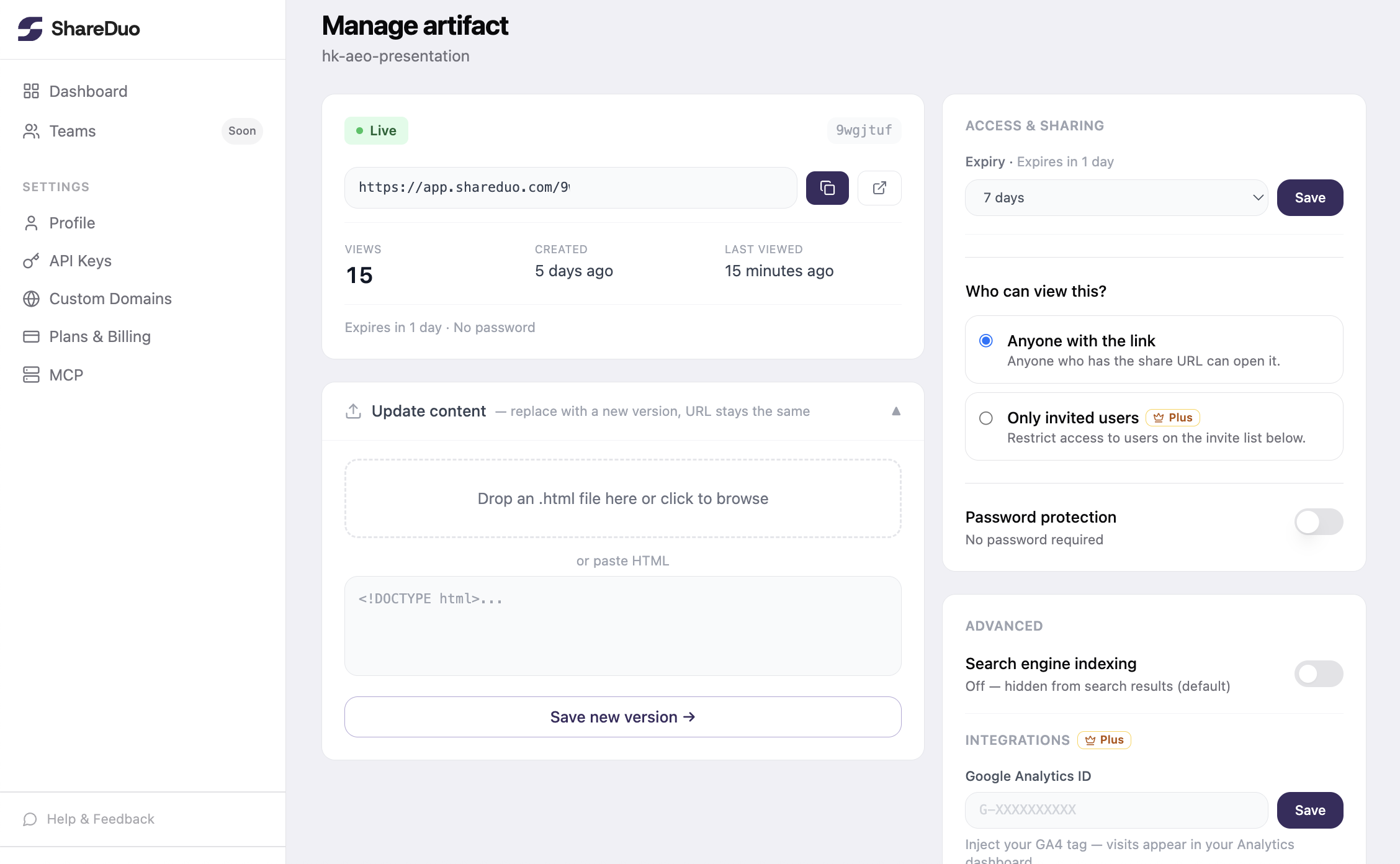
Every ShareDuo link comes with a private manage page where you can see how many times the link was opened and delete it when you're done. The preview runs on a separate domain so interactive artifacts — those using Chart.js, Google Fonts, CDN scripts — work exactly as Claude built them.
Can you share a Claude artifact without leaving the conversation?
If you use Claude frequently, ShareDuo has an MCP server that lets Claude push artifacts directly without leaving the conversation. You say "share this artifact" and Claude uploads it and returns the link — no copy-paste required. See the GitHub repo for setup instructions, or see all the ways to share a Claude artifact if you'd rather compare alternatives.
Summary
- Claude's Publish creates a public link — standard HTML artifacts are viewable by anyone, no account needed
- The gaps: no expiry, no password, no analytics, and published artifacts may be indexed by search engines
- ShareDuo hosts the HTML on a public URL with full access control — takes ~30 seconds, free, no signup required
Ready to share your Claude artifact?
Free, no signup. Anyone can view the link — no Claude account needed.
Get my shareable link →